-

English
-
Japanese
-
Korean



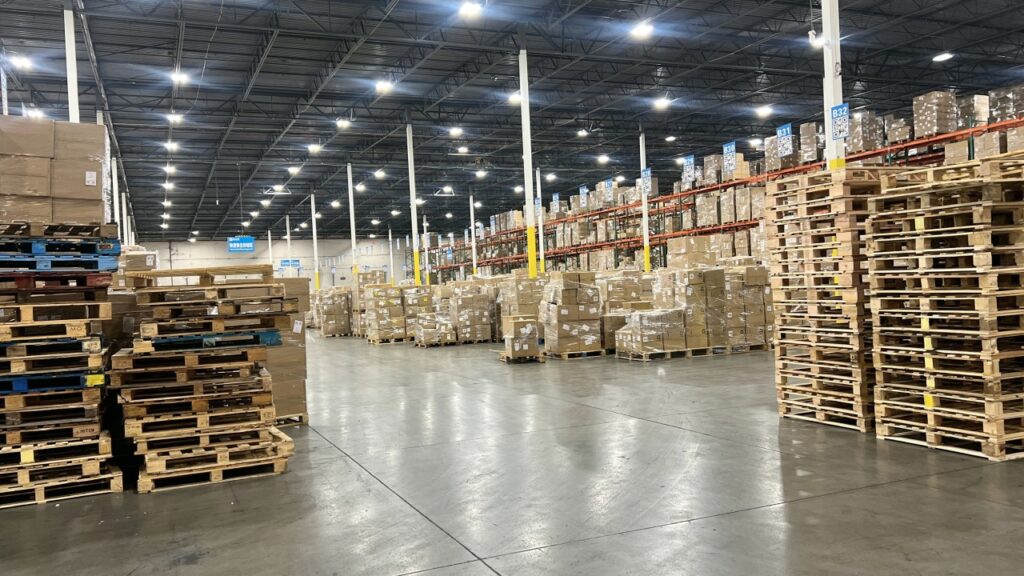
For sellers using Amazon's Fulfillment by Amazon (FBA) service, understanding the pallet requirements is crucial to ensure smooth and efficient delivery of goods to Amazon's fulfillment centers. Properly prepared pallets help prevent delays, additional fees, or rejections.
Pallet Specifications
- Standard Size: Amazon requires the use of standard 40 inches x 48 inches (101.6 cm x 121.9 cm) pallets. These are typically referred to as GMA pallets.
- Material: Pallets should be made of sturdy wood or plastic. They must be in good condition, free of damage, and capable of supporting the weight of the goods without breaking.
- Weight Limit: The maximum weight for a fully loaded pallet is 1,500 lbs (680 kg).
- Height Limit: The total height of the pallet, including the goods, should not exceed 72 inches (182 cm).
Pallet Loading and Stacking
- Secure Stacking: Products must be stacked securely on the pallet to prevent shifting during transit. Use shrink wrap or stretch film to secure the load.
- Overhang: Ensure that there is no overhang; products should not extend beyond the edges of the pallet.
- Label Visibility: All labels on boxes must be visible and scannable without unwrapping the pallet.
Labeling Requirements
- Pallet Labels: Each pallet must have a unique pallet label on all four sides. These labels provide Amazon with the necessary information to track and process the shipment.
- Box Labels: Every box on the pallet must have an FBA shipment label. Ensure that labels are not covered by tape or shrink wrap.
Step-by-step Guide on How to Label your Amazon FBA Pallet
Step 1: Prepare Your Shipment in Seller Central
Create a Shipment
Log into your Amazon Seller Central account.
Navigate to the "Manage FBA Shipments" page.
Create a new shipment, following the prompts to input product details, quantities, and destination fulfillment center.
Print Box Labels
Once your shipment is created, Amazon will generate FBA box labels for each box in your shipment.
Print these labels and affix them to each box. Ensure the labels are clear, legible, and not covered by tape or shrink wrap.
Step 2: Prepare the Pallet
Stack Boxes on the Pallet
Arrange the boxes on the pallet securely, ensuring there is no overhang.
Use shrink wrap or stretch film to secure the boxes to the pallet tightly.
Ensure Label Visibility
Make sure that the FBA labels on the boxes are visible and scannable without needing to unwrap the pallet.
Step 3: Print and Attach Pallet Labels
Generate Pallet Labels
In Seller Central, after confirming the shipment details, you will have the option to print pallet labels.
Each pallet requires a unique label, which Amazon uses to identify and track the shipment.
Attach Pallet Labels
Print four copies of each pallet label.
Attach one label to each side of the pallet (front, back, and both sides) to ensure they are visible from any direction.
Use clear plastic sleeves or adhesive pouches to protect the labels from damage during transit.
Step 4: Final Checks
Verify Information
Double-check that all labels contain the correct information and match the shipment details in your Seller Central account.
Ensure the labels are securely attached and protected.
Schedule Delivery
Arrange for your carrier to deliver the pallet to the designated Amazon fulfillment center.
Make sure to schedule a delivery appointment as required by Amazon.
Step 5: Documentation
Bill of Lading (BOL)
Prepare a Bill of Lading for your shipment, detailing the contents and destination.
Ensure the BOL accompanies your shipment for the carrier and Amazon's reference.
Amazon FBA Pallet FAQs
1. What size pallets should I use for Amazon FBA?
You should use standard GMA pallets that measure 40 inches x 48 inches. This size is compatible with Amazon's fulfillment center systems.
2. Can I use plastic pallets for my Amazon FBA shipment?
Yes, both wooden and plastic pallets are acceptable. However, ensure they are in good condition and can support the weight of your shipment.
3. What is the maximum weight limit for pallets shipped to Amazon FBA?
The maximum weight for a fully loaded pallet is 1,500 lbs (680 kg).
4. Do I need to comply with ISPM-15 regulations for pallets?
If you are shipping internationally, wooden pallets must comply with ISPM-15 regulations, which require heat treatment or fumigation to prevent pest infestation.
5. How should I label my pallets for Amazon FBA?
Each pallet should have four labels, one on each side. These labels are generated in Seller Central and must be visible and protected from damage.
6. Can I mix different products on the same pallet?
Yes, you can mix different products on the same pallet, but ensure that each box is properly labeled with its corresponding FBA label.
7. How high can I stack boxes on a pallet?
Pallets should not exceed 72 inches in height, including the pallet itself. This ensures stability and safety during transit and handling.
8. What should I do if my pallet shipment is rejected?
If your shipment is rejected, review the rejection reason provided by Amazon. Common issues include incorrect labeling, damaged pallets, or unscheduled deliveries. Correct the issue and reschedule the delivery.
9. Are there any specific requirements for pallet construction?
Pallets must be sturdy, free from damage such as broken boards or protruding nails, and capable of supporting the shipment's weight. Ensure they are constructed to withstand handling and transportation.
Meeting Amazon FBA's pallet requirements is essential for a successful partnership with the platform. Proper preparation not only helps maintain compliance but also enhances the overall efficiency of your supply chain operations.

Linkw
Our large-scale warehouses span 800,000 square feet across seven branch offices in the U.S.A., and the U.K.
Table of Summary